
KeyRing Password Manager - Get APK
You'll be able to download in few seconds.
Publisher Description

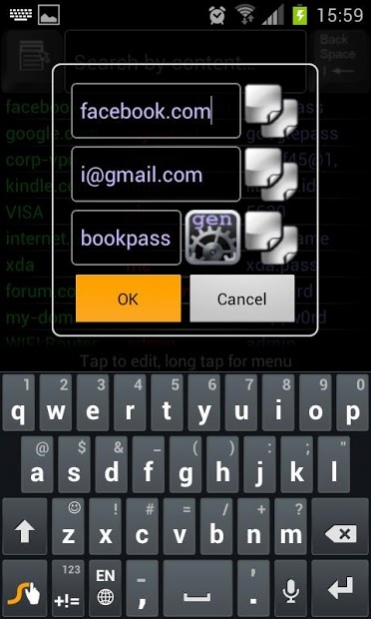

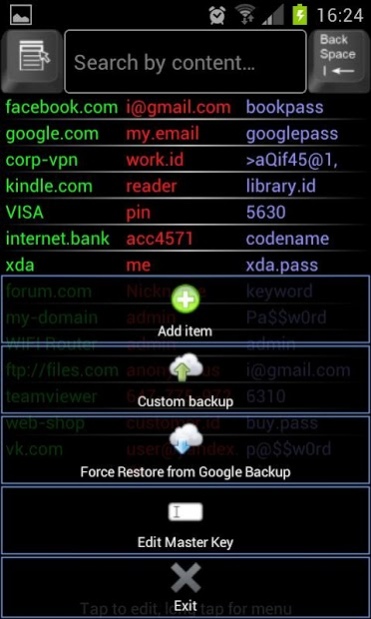
This password manager is designed to provide secure and comfortable storage of your accounts. All fields are visible on your screen and can be found easily by a quick text filter!
Desktop version available (WIN, LINUX, OS X):
https://www.dropbox.com/s/4x406cmanfqoj7h/KeyRingDesktop.jar?dl=0
The Master-Key is a password invented by yourself for the protection of your data. It can be any sequence of letters, digits or numbers at your choice. Please, do not forget your master key to avoid the loss of your data due to inability to decrypt the database.
Attention, please! If you are not satisfied with this application, you can refund your expenses by uninstalling it within 15 (fifteen) minutes from the moment you bought it.
Make your password management easier and quicker than ever with a "Single Look" user interface, which provides a better way to manage personal data as an "all-in-one" list of accounts with corresponding usernames and passwords. The list is made simple by the text filter and the Long Press Copy function. Say goodbye to heavy multiple forms with lots of fields!
All you need to remember is the Master Key of your choice, which must be entered at startup. Master Key is used to encrypt the password database and to restrict unauthorized access to your personal data. It is not stored anywhere and is only used for encryption and decryption purposes. If the database was previously encrypted with one master key it will not be successfully decrypted with another one. Please, do not forget your Master Key!
KeyRing Password Manager is compatible with its Windows Mobile version. If you want to import the windows mobile account database, you should copy "config.bin" file into the "/mnt/sdcard" directory of your android phone.
Even hard-reset of your phone can not damage your database, which is located on "/mnt/sdcard/" directory of your device and is auto synchronized with your google account cloud backup services.
If you have forgotten your Master-Key and nevertheless want to continue using this app, you should delete the existing database file "/mnt/sdcard/config.bin". On the next launch the app will ask for a new Master-Key and will create a new empty database.
In case you have a Google account and automatic synchronization enabled, application database will be automatically backed up by Google Backup Services. This behaviour provides an opportunity to automatically restore the database from Google Backup cloud after application deletion and sdcard format. The database will be restored by Google account on the next installation of the app.
Supported languages: EN, RU. For your native language support please send the translation of the language file {http://house-intellect.ru/Documents/keyring-translation.odt} to the mailbox {sales@house-intellect.ru}. The localized version will be published as soon as possible.
About KeyRing Password Manager
The company that develops KeyRing Password Manager is house-intellect. The latest version released by its developer is 1.0 .
To install KeyRing Password Manager on your Android device, just click the green Continue To App button above to start the installation process. The app is listed on our website since 2016-03-15 and was downloaded 0 times. We have already checked if the download link is safe, however for your own protection we recommend that you scan the downloaded app with your antivirus. Your antivirus may detect the KeyRing Password Manager as malware as malware if the download link to house_intellect.keyring is broken.
How to install KeyRing Password Manager on your Android device:
- Click on the Continue To App button on our website. This will redirect you to Google Play.
- Once the KeyRing Password Manager is shown in the Google Play listing of your Android device, you can start its download and installation. Tap on the Install button located below the search bar and to the right of the app icon.
- A pop-up window with the permissions required by KeyRing Password Manager will be shown. Click on Accept to continue the process.
- KeyRing Password Manager will be downloaded onto your device, displaying a progress. Once the download completes, the installation will start and you'll get a notification after the installation is finished.
Program Details
System requirements
Download information
Pricing
Version History
version
posted on 2016-03-15
version
posted on 2016-03-14
Added support for Android 5+
version Varies with device
posted on 2013-07-01
Several fixes and updates
Disclaimer
External Download
We do not host KeyRing Password Manager on our servers. We did not scan it for viruses, adware, spyware or other type of malware. This app is hosted by Galad and passed their terms and conditions to be listed there. We recommend caution when installing it.
The APK Download link for KeyRing Password Manager is provided to you by apps112.com without any warranties, representations or guarantees of any kind, so access it at your own risk.
If you have questions regarding this particular app contact the publisher directly. For questions about the functionalities of apps112.com contact us.
